
Saturn Calendar
Saturn Technologies Inc.Productivity
4.3767.00 Reviews
- Version
- 3.41.01.1586
- Installs
- 500.00K
- Age Rating
- Everyone
Screenshots
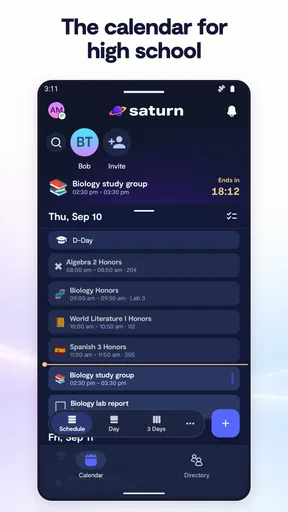
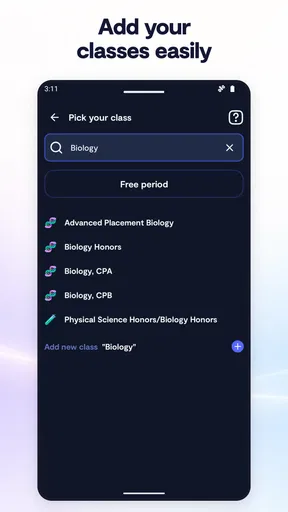
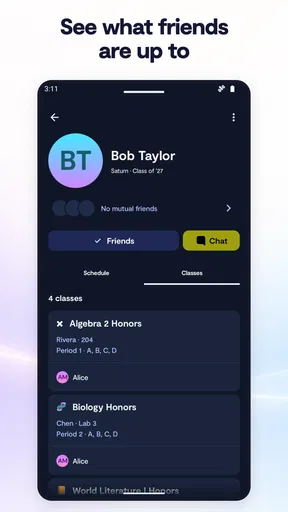
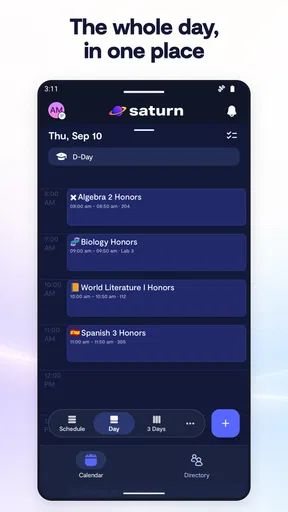
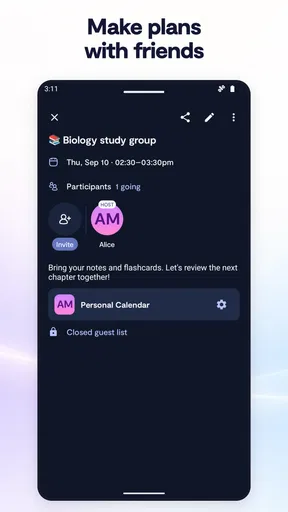
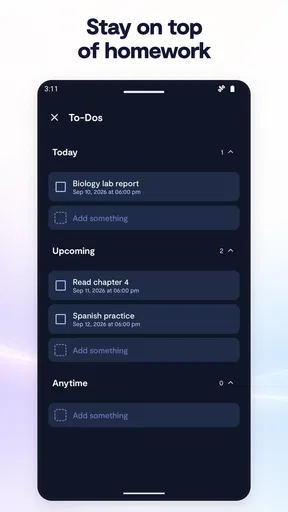
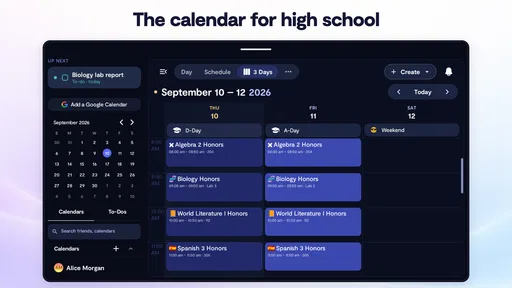
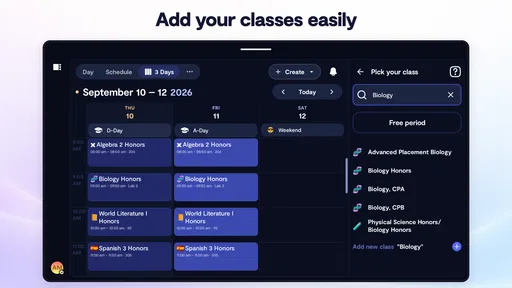
Our Review of Saturn Calendar
 Analysis by Appyee
I started using Saturn Calendar because I wanted a schedule that felt less like a static list of appointments and more like a place to keep track of the people and plans around me. Saturn Technologies Inc. presents it as a productivity app built around schedules, events, and friends, and that combination gives it a noticeably more social personality than a basic calendar. It is free, aimed at everyone, and currently listed at version 3.41.01.1586 for devices running Android 10 or later.
After spending time with it, my impression is that Saturn Calendar works best for people whose plans change through conversation: students coordinating with classmates, friends arranging meetups, or anyone who wants their social commitments visible alongside ordinary tasks. It is not automatically the best replacement for a work calendar, a detailed project planner, or a private journal. Its appeal comes from bringing shared activity and personal scheduling closer together, so the right question is not simply whether it has a calendar view. The better question is whether that social approach matches the way you actually organize your week.
How Saturn Calendar fits into everyday planning
I find Saturn Calendar easiest to judge by starting with the moment a schedule usually gets messy: someone suggests a plan, but I need to check what else is happening before I can give a reliable answer. This section looks at how its people-centered approach fits that everyday decision, then turns to the setup checks that can make the first use feel smoother.
A calendar designed around people as well as appointments
Most calendar apps begin with a date, a time, and a reminder. Saturn Calendar feels more interested in the context around those entries. The “friends” part of its identity matters because plans are rarely isolated. A study session, lunch, sports practice, or evening out usually involves other people, and seeing those activities in one place can reduce the back-and-forth that normally happens in messages.
That makes the app especially easy to understand for someone who thinks in terms of a weekly rhythm rather than a long list of disconnected tasks. I can look at a day and ask not only what I need to do, but also which plans involve other people and where an open space remains. This is a small shift, yet it changes how useful the calendar feels when the main challenge is coordination rather than remembering a dentist appointment.
The app belongs in the productivity category, but I would not compare it only with task managers. Its closest alternatives depend on the job. A conventional calendar is often stronger for formal appointments and work commitments. A to-do app is usually better for breaking a large project into steps. A messaging app is faster for conversation. Saturn Calendar occupies the space between those tools, where a plan needs both a time slot and a social connection.
What the free price means in practical terms
There is no purchase price to budget for: Saturn Calendar is available for free. That makes it easy to try without deciding whether the app deserves a subscription or a one-time payment first. For a student or a group of friends, that low barrier is important because a shared planning tool only becomes useful when the people you want to coordinate with are willing to use it too.
I would still separate “free to access” from “guaranteed to replace every other planning tool.” The value comes from whether its schedule-and-friends approach fits your routine, not from the absence of a price tag alone. If you need advanced professional scheduling, deep task dependencies, or a carefully controlled business workflow, a specialized paid service may offer better value for that specific purpose even though Saturn Calendar costs nothing.
The app has built a visible user base, with more than 500 thousand installs and an average rating of 4.3 from around 4.5 thousand ratings. Those figures suggest that the concept has found an audience, but they should not be treated as proof that every user will prefer its style. A calendar is intensely personal: the same social features that make planning easier for one person may feel unnecessary or distracting to another.
A realistic week with the app
Imagine a student who has classes during the day, a group assignment approaching, and friends trying to arrange an evening together. With a plain calendar, the student may enter classes and then use a group chat to negotiate the rest. Saturn Calendar can make the schedule itself the place where those plans are easier to see together. The benefit is not merely fewer taps. It is the ability to notice conflicts before agreeing to something and to spot a genuinely free window without reconstructing the week from several conversations.
My practical advice is to begin with the commitments that cause the most confusion, not every small activity in your life. Add fixed obligations first, then use the social planning side for recurring coordination. This creates a useful overview quickly. If you fill the calendar with every minor thought, the shared planning benefit can disappear under noise, especially on busy weeks.
Small workflows that make the concept more useful
One useful approach is to treat the calendar as a negotiation surface. Before replying “sure” to a friend, check the schedule and decide whether you have enough time for travel, preparation, and recovery afterward. This is more realistic than checking only whether two event times overlap. The calendar becomes a tool for protecting your time rather than simply recording decisions already made.
A second approach is to separate fixed events from flexible plans in your own habits. Keep classes, work shifts, and appointments as anchors. Use social events around them, leaving visible gaps instead of packing every minute. That makes Saturn Calendar more valuable for spotting availability and less likely to become an attractive but unrealistic timetable.
A third insight is that the app can help reveal patterns in your social commitments. If every evening is filled with informal plans, the problem may not be poor memory but a lack of recovery time. Looking at the week as a whole can make that obvious. A traditional task list may tell you what remains undone; a socially aware calendar can show why there is no energy left to do it.
Where the experience may feel less comfortable
The social angle also creates the app’s main trade-off. Not every plan needs to be visible to friends, and not every user wants personal organization to overlap with social activity. If your ideal calendar is quiet, private, and almost entirely administrative, Saturn Calendar may feel like it is solving a problem you do not have.
There is also a mental adjustment involved. People moving from a conventional calendar may initially expect the app to behave like a neutral filing cabinet for appointments. Saturn Calendar asks you to think more deliberately about shared plans and availability. That can be refreshing, but it means the app is not a universal fit simply because it displays dates and events.
I would also avoid making it the only place for critical professional commitments until you are comfortable with your own workflow. For important deadlines, I prefer a second dependable reference while testing any new calendar. This is not a criticism of a particular feature; it is sensible practice whenever an app becomes responsible for remembering something consequential.
Who is most likely to get real value
Saturn Calendar is a strong candidate for people whose schedules are closely tied to friends or classmates. It makes the most sense when coordination is a daily concern rather than an occasional inconvenience. A student managing classes, study groups, activities, and social plans is a particularly natural match because the week contains many events that are both scheduled and shared.
It can also suit someone who dislikes switching between a calendar and a conversation every time a plan changes. The app’s central idea is useful when the decision, the people involved, and the time slot belong together. If you frequently ask “when are you free?” or “does this clash with anything else?”, the social calendar approach may save enough friction to justify changing habits.
The Everyone content rating also makes it approachable for a broad audience. That does not mean every age group will use it in the same way, but there is no need to approach it as a niche professional tool. Its strongest users are likely to be those who want everyday scheduling to feel more connected and less formal.
Who should choose a different kind of app
I would skip Saturn Calendar if your main need is detailed task management. Someone handling a complex work project may be better served by an app built around assignments, dependencies, documents, and progress tracking. A calendar can show when work happens, but it is not automatically the best place to manage everything that work contains.
I would also hesitate if you need a highly traditional business calendar with strict separation between personal and professional commitments. In that situation, a mature workplace calendar may be the safer choice because its conventions are designed around meetings, shared availability, and formal scheduling rather than social planning.
Finally, people who prefer to keep their social life outside productivity software may find the concept unnecessary. There is nothing wrong with using a simple calendar for appointments and a messaging app for friends. Saturn Calendar earns its place only when bringing those areas closer together genuinely reduces effort.
What to consider before making it your main calendar
The most important question is whether your friends or groups will participate in the same planning habit. A social calendar becomes more useful as coordination becomes shared, but it can still function as a personal schedule if you use it alone. The difference is that the app’s distinctive value is easier to feel when your plans are not isolated from the people connected to them.
It is also worth checking your device compatibility before committing time to setup. The listed minimum operating system is Android 10, so older Android devices may not be suitable. On a supported phone, I would spend the first session testing the flow of adding ordinary events, checking the week, and handling a plan involving someone else. That gives a better impression than judging the app from its store summary alone.
Because the current version is 3.41.01.1586, I would keep the app updated through the normal store process. Calendar software depends on reliable day-to-day behavior, and using the current release is the sensible way to evaluate it. I would also make a habit of reviewing the week at a consistent time, such as Sunday evening or the start of a school day. The app can organize information, but it cannot compensate for never looking at the schedule.
My final recommendation
Saturn Calendar is worth trying if you want a free productivity app that treats events as part of a social life rather than as isolated boxes on a grid. I like the way its focus encourages a more honest view of availability: a free hour is not always truly free if travel, preparation, or another commitment sits nearby. That perspective is more useful to me than a calendar that merely records appointments after the fact.
Its limitations are tied to the same design choice that makes it interesting. The social emphasis will not appeal to everyone, and it should not be mistaken for a complete project manager or a universal replacement for established work calendars. If your needs are formal, highly detailed, or intentionally private, another category of app will probably serve you better.
For students, socially active users, and groups that constantly coordinate plans, I would recommend giving it a fair trial. Start with a small number of fixed commitments, add the recurring plans that usually create conflicts, and judge whether the shared schedule reduces message-heavy negotiation. With an average rating of 4.3 and a growing audience, Saturn Calendar has clearly attracted interest, but its real value is personal: it is best when your calendar needs to understand who your time is connected to.
My buy-or-skip verdict is simple. Since the app is free, there is no purchase decision to justify, but there is still a time investment to consider. Try Saturn Calendar when social coordination is the reason your schedule feels messy. Skip it when you only need a private appointment book or a powerful task-management system. For the right routine, it is a thoughtful alternative to keeping plans scattered between a standard calendar and several conversations.
Verdict
Strengths of Saturn Calendar
- Clean, easy-to-read calendar layout
- Useful views for planning days, weeks, and months
- Quick event creation saves time
- Helpful reminders reduce missed appointments
- Works well for organizing personal schedules
Limitations of Saturn Calendar
- Some advanced features may require a paid upgrade
- Limited collaboration tools for shared calendars
- Customization options may feel somewhat restricted
- Initial setup can take time for new users
- Battery use may increase with frequent notifications
Similar Picks in This Category
View All
Google Calendar
Google LLC4.6

Google Drive
Google LLC4.3

Google Assistant
Google LLC3.9

Microsoft OneDrive
Microsoft Corporation4.6

Samsung Calendar
Samsung Electronics Co., Ltd.4.1

Microsoft OneNote: Save Notes
Microsoft Corporation4.6
Frequently Asked Questions
What is Saturn Calendar, and what can I use it for?
Saturn Calendar is a digital calendar and planning app designed to help users organize events, classes, assignments, activities, and personal commitments in one place. It is particularly useful for students and busy users who need a clear overview of their schedules. Before downloading, check which calendar, reminder, sharing, and customization features are available on your specific Android or iOS version.
Is Saturn Calendar suitable for students and school schedules?
Yes, Saturn Calendar is mainly aimed at making school and student scheduling easier. You can typically use it to keep track of classes, homework, exams, extracurricular activities, and other important dates. Its usefulness depends on how accurately you enter your timetable and whether your school or organization supports any available integrations. Always review the app’s current feature list before relying on it for essential deadlines.
Does Saturn Calendar require an account or personal information?
Depending on the platform version and the features you want to use, Saturn Calendar may require you to create an account or provide information such as your name, email address, school details, or schedule data. This information can help with synchronization, social features, and access across devices. Before registering, read the privacy policy and review the permissions requested so you understand how your data may be handled.
Can I share my schedule or connect with friends in Saturn Calendar?
Saturn Calendar may include social or sharing-oriented tools that allow users to coordinate schedules, view relevant activities, or connect with friends and classmates. These options can be convenient for planning group activities, but they may also expose parts of your schedule or profile to other users. Carefully check visibility settings, contact permissions, and sharing controls before adding people or publishing calendar information.
Is Saturn Calendar free to download and use?
Saturn Calendar may be available as a free download, but some features, upgrades, or services can vary by platform, region, or subscription plan. Check the official Google Play Store or Apple App Store listing for current pricing, in-app purchases, supported devices, and account requirements. If the app offers optional paid features, review the billing terms and cancellation process before starting a trial or subscription.
